As We all know the best graphic asian game is PRINCE OF PERSIA it has got 4 parts all are very good and we all like to play so i brought it's trainer of
NOTE: THIS VPN IS SUCCESSFULLY TESTED WORKING ON AIRTEL, TATA DOCOMO AND VODAFONE AT OR BELOW 0Rs BALANCE Vodafone VPN 100% working All over India is CPROXY Both 2G and 3G if you don't have download it from here
FOR VODAFONE 1. set the APN:www FOR TATA DOCOMO 1.Set the APN:TATA.DOCOMO.INTERNET FOR AIRTEL
1.set the APN: airtelgprs.com
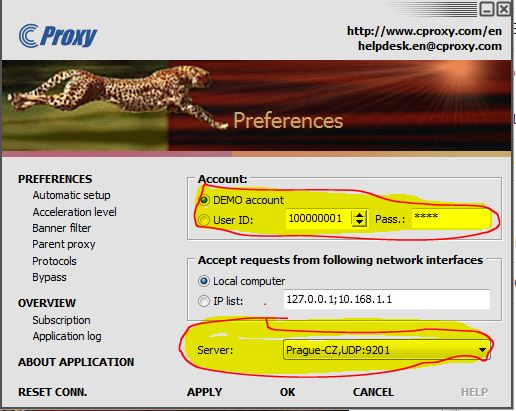
2. now in cproxy set the server to As shown in the pic below REGISTER AND SET THE REGISTERED USER ID AND PASSWORD
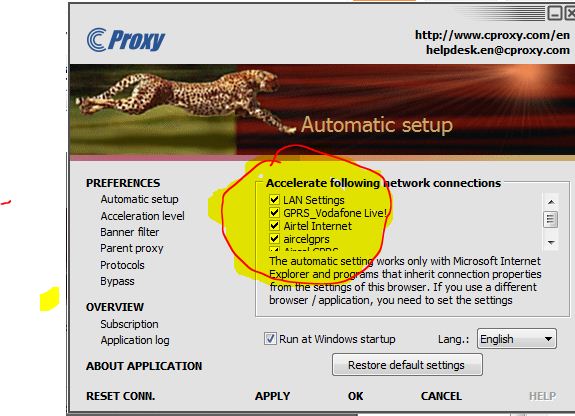
3. now select network connections
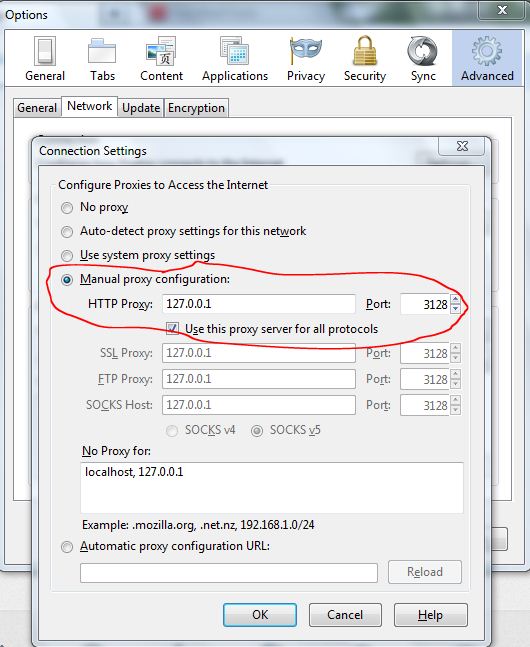
4. now click on apply and ok 5. If you are mozilla firefox and IDM(internet download manager) you have to do settings by yourself in mozilla go to options and then ADVANCE tab as shown below
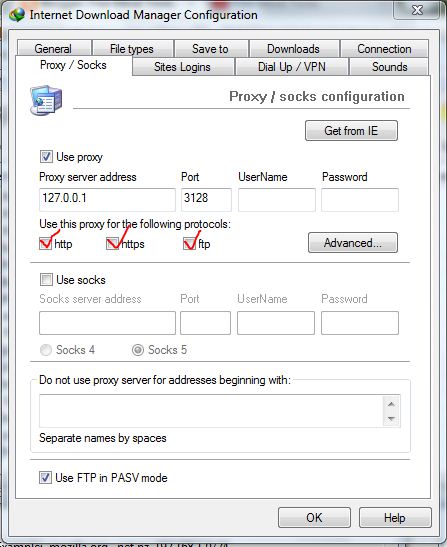
Now do setting in IDM click on download tab and click on options and go to proxy/socks tab and do setting as shown below and tick all the boxes
1. click the drop-down list button and choose ONLY @ hushmail.me or @hush.ai (those are the only domains that work!) 2. Click USE AN AUTOMATICALLY GENERATED EMAIL ADDRESS 3. For Choose your passphrase, type anything you want (this will serve as your password) 4. Re-type your passphrase in #3 5. copy the captcha 6. Tick I have read and agree to abide by the terms of service 7. Tick I understand blah blah blah... 8. Click create account now.
The following image will show stating that the email account has been created.
9. You may now log in to your new account.
10. Use this email account in creating cproxy account.
ONE IMPORTANT MESSAGE FOR PEOPLE USING INTERNET DOWNLOAD MANAGER "YOU ALL CAN JUST DOWNLOAD TRAINER BY DRAGING THE DOWNLOAD TO IDM OR JUST COPY AND PASTE THE LINK IN IDM" THANK YOU...... HAVE A NICE DAY......