
Wednesday, August 22, 2012

august 2012 freee tata docomo gprs tricks

TATA DOCOMO FREE GPRS TRICKS
Apn : TATA.DOCOMO.DIVE.IN
Proxy : 220.226.181.88
Port : 8080
Home Page : 122.170.122.214
august 2012 100% working docomo free gprs tricks
TATA DOCOMO OPERA HANDLER TRICK
MAKE NEW SETTINGS
Proxy : 220.226.181.88
Port : 8080 or 80
OPEN HANDLER
Set Socket Server to http://220.226.181.88.server4.operamini.com
OR
http://203.115.112.5.server4.operamini.com
just save settings
Tuesday, July 3, 2012
watch video on youtube with less buffers
First of all
open a link http://www.youtube.com/feather_beta
after opening this link in the page click on
open a link http://www.youtube.com/feather_beta
after opening this link in the page click on
Join the "Feather" Beta
then open http://www.youtube.com/html5
then click
Join Html5
That's all
by this u will be able to load videos fast
Sunday, June 24, 2012
People's VPN working Free
Peoples VPN Unlimited Download Supporting many ports
Its known that Peoples VPN is a Reliable and Premium VPN which was working recently with some Networks. The Servers of People VPN’s are 100% Secure. now another Biggest Advantage is Peoples VPN can also be used in Android Phone. so it will be easy to Connect Internet on Android Pone with Peoples VPN Unlimited Download. Now Peoples have updated Their Configs and Servers with many New Posts supported. So peoples VPN can be used i various Networks which Ports are opened, lets see how to Do it.
Peoples VPN Unlimited Download With New Ports

It has always been a very confusion job to connect or configure VPN, But what can be done, if you want to Use it free, then this steps are needed to Done. Coming to Peoples VPN Unlimited Download there is only one Drawback that: you have to register on their official Website again and again in the interval of 5 Days. but that’s not a Tough Task, it can be done easily. also you do not need to Verify any Email address to use their username and passwords another advantage is you can use the Same Email address several Times.
Features of Peoples VPN Unlimited Download
- Free Servers Upgraded
- Unlimited Download
- Supports UDP Posts
- High Speed VPN
- Safe and Reliable Service
- You need to Register once in 5 Days
- Now there are many ports working with this VPN
- Working in Airtel, Vodafone and Idea
- Supports TCP-443
Steps to Use Peoples VPN Unlimited Download
Peoples VPN Supports Numerous of Ports, so for those who were Looking for a Premium VPN and knows how to edit a Config then you must use this Peoples VPN Unlimited Download .
Currently peoples VPN Supports: UDP 53, 80, 137, 9201, 1021
- Peoples VPN also Supports TCP 80 and 443.
- So if any of the Above UDP posts are opened inn your State, you can use this People’s VPN with unlimited Download, just you need to configure with Host of your Network.
- Download Peoples VPN
- You do not need NMD VPN to use it. also It has all Servers in it. If you want you can just Modify it.
- After Registering you can directly use The Username and Password, you even don’t need to Verify your Email Address.
- Note: This seems to be working almost all over India. The Speed and Reliability is much better than others VPN. So instead of using other insecure VPN’s Its better to use the Peoples VPN Unlimited Download and enjoy High Speed Internet
Screenshot:


Done! This screenshots was taken using UDP protocol, as you can see the speed is much better in UDP, so if UDP Works on your State, you must use it. or else TCP-443 is always an Option left, Enjoy this new Peoples VPN Unlimited Download. Like us on Facebook to get latest Updates
Friday, June 22, 2012
Tata Docomo Free latest gprs

Trick to use free GPRS in Tata Docomo Keep Liking Us On FAcebook For our Encouragement
Hello Friends m give you A new trick ,This trick is working in many states of India.plz cooment if this this working your states...
APN: Tata.docomo.dive.in
Proxy: 10.124.94.8
Port: 8080
Homepage: www.freemindtrickz.co.cc APN: Tata.docomo.dive.in
Proxy: 10.124.94.8
Port: 8080
Tata Docomo 500MB gprs trick

Just follow these steps :
type “GALAXY” or “WINDOWS” or “ANDROID” (mine worked in docomo with galaxy)
and send to “54321″
you will get a confirmation message from the provider saying “your free 500 mb data will be activated in couple of hours”
thats it. please check back after some hours for the free 500 mb data credited to your account.
But Try it. I your luck's good it can be eligible for 500mb free...
(Note: The trick works on “GALAXY” or “WINDOWS” or “ANDROID” phones}
don't forget to like us on facebook.
follow us on twitter.
6 GB vodafone Greatest GPRS hack

6GB Vodafone Gprs Hack
BE Happy
Hii Friends !I m posting Some GPRS Tricks Today. With this trick you can get More than 6 GB Free Data Usage for 6 Months, this Trick is tested and 100 % working
Lets Come to the Trick.
Vodafone Free 6 GB Trick Just Type ACT FB and Send it to 144 .After Sometime you will get Confirmation message that 6144 MB is credited to your Account and Valid For 6 Months .
TRY IT BELOW 5 RS. BALANCE
like us on facebook and twitter
Wednesday, June 6, 2012
how to use register CPROXY
About Last Cproxy Trick:
You Have TO Register After Few TIme Because They Give Only Nearby 80 Mb Trial
Go to this link to resigster new id on yahoo because it do not require verification
https://edit.europe.yahoo.com/registration?_intl=uk
Then Registor on Cproxy.
When sometimes it shows you to wait you for 10 seconds or 30 seconds then url box type these charecter -
/?
slash and question mark and you will not have to wait.
You Have TO Register After Few TIme Because They Give Only Nearby 80 Mb Trial
Go to this link to resigster new id on yahoo because it do not require verification
https://edit.europe.yahoo.com/registration?_intl=uk
Then Registor on Cproxy.
When sometimes it shows you to wait you for 10 seconds or 30 seconds then url box type these charecter -
/?
slash and question mark and you will not have to wait.
CPROXY WORKING ALL OVER INDIA TESTED
Just Follow the Simple Steps:
Step1: First Download Cproxy VPN from http://www.cproxy.com/download/cpsetup.exe
Step2: Now Go to Sign Up with your email id onthis link:http://www.cproxy.com/default.aspx?pg=13&lg=2
Step3: Now Check Your Email to Get Username and Password to Login Cproxy Vpn.
Step1: First Download Cproxy VPN from http://www.cproxy.com/download/cpsetup.exe
Step2: Now Go to Sign Up with your email id onthis link:http://www.cproxy.com/default.aspx?pg=13&lg=2
Step3: Now Check Your Email to Get Username and Password to Login Cproxy Vpn.
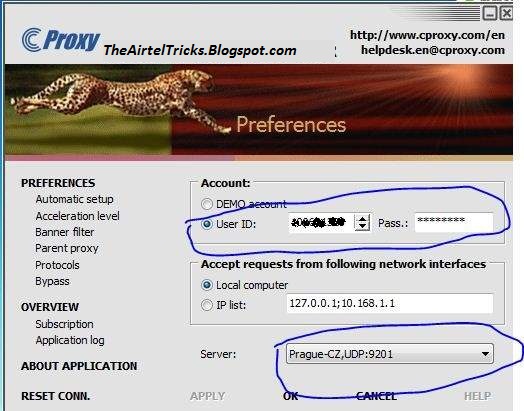
Step5: Thats it, Now Click Ok and Open Internet Explorer First.
Note: You have to do settings manually in IDM or Firefox or other than I.E , Just do as
Proxy=127.0.0.1
port=3128
Subscribe to:
Posts (Atom)


